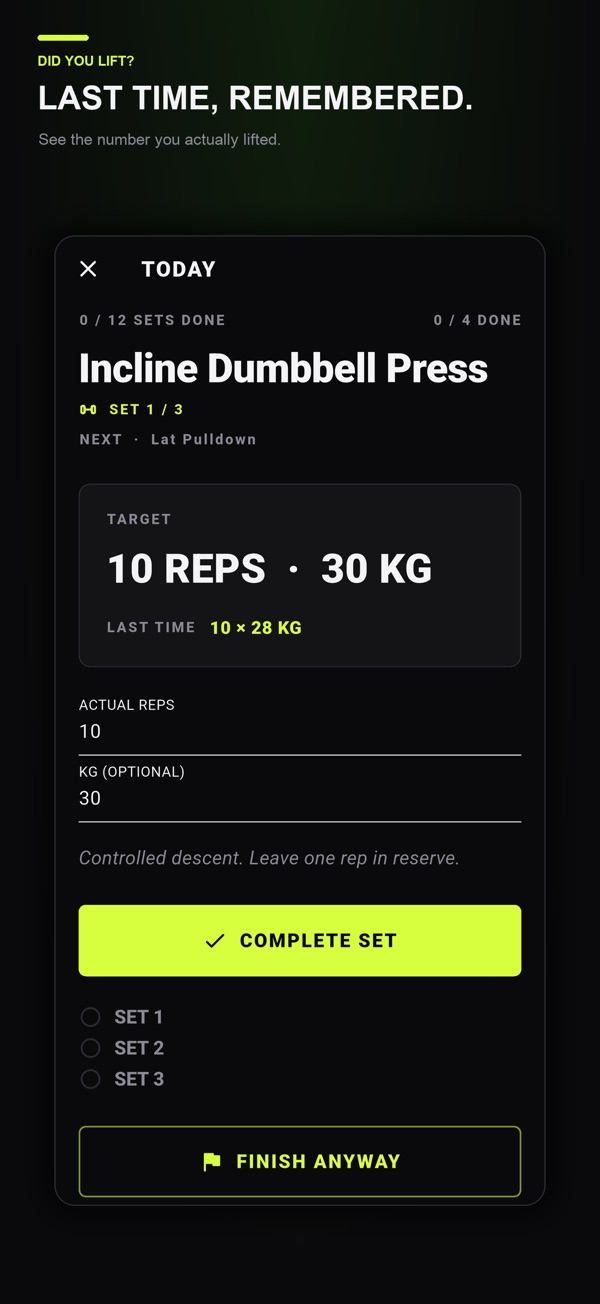
Record the exercise, equipment, set number, actual reps or time, and load. Keep planned targets separate and use the same naming and weight conventions each time.
Set up a record you can use between sets
A useful entry has a date, a clear exercise name, the planned target and what you actually completed. Did You Lift combines that set-by-set record with a weekly planner and automatic rest timer on iPhone and Android. The same fields also work in a notebook if you want to try the method first.
| Field | Example entry | When to fill it in |
|---|---|---|
| Session date | September 22 | Before starting |
| Exercise and equipment | Seated cable row, same machine | Before starting |
| Weight convention | Machine label in kg | Before starting |
| Set target | Set 1: 10 reps at 30 kg | From your existing program |
| Actual set result | Set 1: 10 reps at 30 kg | After completing the set |
| Relevant context | Different attachment on the last set | When something changes |
The numbers are examples of record fields, not a routine to follow. If you are still separating a plan from a result, read workout planner versus workout log before entering an entire week.

Choose a name you can recognize next week
“Row” can describe a cable row, dumbbell row or machine exercise. Pick a name that identifies the movement and record the equipment. If the setup matters to comparison, keep a short note such as the machine setting or the grip used.
Consistency matters more than elaborate naming. Two sessions with the same label should describe similar work. If you deliberately change the exercise or setup, make that change visible in the record. The busy-gym substitution story shows how to label a replacement without putting its results under the exercise you did not use.
Separate the target from the completed set
| Set | Planned target | Actual result | Note |
|---|---|---|---|
| 1 | 10 reps at 30 kg | 10 reps at 30 kg | Completed as planned |
| 2 | 10 reps at 30 kg | 9 reps at 30 kg | Keep actual reps in the log |
| 3 | 10 reps at 30 kg | 8 reps at 30 kg | Do not copy the target into the result |
This example records 27 actual repetitions, not the planned 30. At the same entered load of 30 kg, the completed volume load is:
(10 × 30) + (9 × 30) + (8 × 30) = 810 kg
Copying the target into every result would instead report 900 kg and overstate what the record shows. You can check the arithmetic in the free workout volume calculator. The number summarizes the entered reps and load; it does not measure technique or decide what you should lift next.
If you complete only the first two sets, leave the third as uncompleted and add context if useful. A planned set that did not happen is different from a completed set with zero external weight.
Define your weight and time conventions
For a barbell exercise, be clear whether the entered load includes the bar. For paired dumbbells, choose whether your record describes one dumbbell or the combined external load. Keep that convention consistent and mention it in the exercise note.
Did You Lift uses kilogram targets for strength sets and seconds for timed movements. If your equipment is labeled differently, convert deliberately before entering a target. Do not mix pounds and kilograms under the same label and then compare the numbers directly.
For bodyweight movements without added load, record reps or duration even when weighted volume is zero. The absence of an entered external weight does not make the exercise disappear from your session.
Review the last comparable session before the next one
A short note can explain why two sessions differ. A different machine, a changed order or an interrupted session may be useful context. Before comparing numbers, ask:
- Was this the same exercise and equipment setup?
- Did both entries use the same units and dumbbell or barbell convention?
- Which sets were actually completed, and did reps or load change?
- Was there a change in rest, setup or session order worth noting?
For the example above, “30 kg for 10, 9 and 8 reps” is the useful record to carry forward. It does not automatically mean that the next session should use a heavier weight or a different number of sets. Use your existing program or a qualified coach to decide how targets should change.
If your aim is to track changes over time, the progressive-overload logging guide explains how to keep comparisons meaningful.
Put the template into Did You Lift
Build your planned day, add exercises and set the intended reps or time for each set. During the workout, enter actual reps and weight, then complete the set. The app moves into the rest countdown and keeps the next set visible in sequence.
Optional Lifetime Premium includes seeing the last logged values when an exercise returns and saving or sharing workout plans. It is a one-time purchase, not a recurring subscription. An exported routine contains planned targets, not your completed workout history.
See Did You Lift and download it for your phone if you want the log and timer in one place. To organize several sessions before starting, use the weekly workout-planning worksheet.
Common questions
Should I record warm-up sets?
If you record them, label them consistently so you can distinguish them from the working sets you intend to compare. The important part is not silently changing what a total includes.
Should I log planned reps or actual reps?
Keep both if useful, but label them separately. The actual result is the record of what you completed.
What should I record if I stop a workout early?
Keep the results for completed sets, leave remaining planned sets uncompleted, and add a brief note if useful. Do not copy the remaining targets into your actual results.
Published by Moocsoft, the independent studio behind Did You Lift. Examples and worksheets are illustrative. App features can vary by platform and version; see the store listing for current availability and in-app purchases.