Plan exercise order, target sets, reps and rest before training; log actual load, reps and relevant changes during the session; use the difference to prepare the next workout.
Separate the plan from the completed record
| Field | Plan before training | Log after each set |
|---|---|---|
| Exercise | Selected movement and order | Movement actually performed |
| Sets and reps | Target range or exact target | Completed sets and repetitions |
| Load | Intended starting load | Load actually used |
| Rest | Planned interval | Timer or meaningful change |
| Notes | Setup cue or constraint | Relevant result or modification |
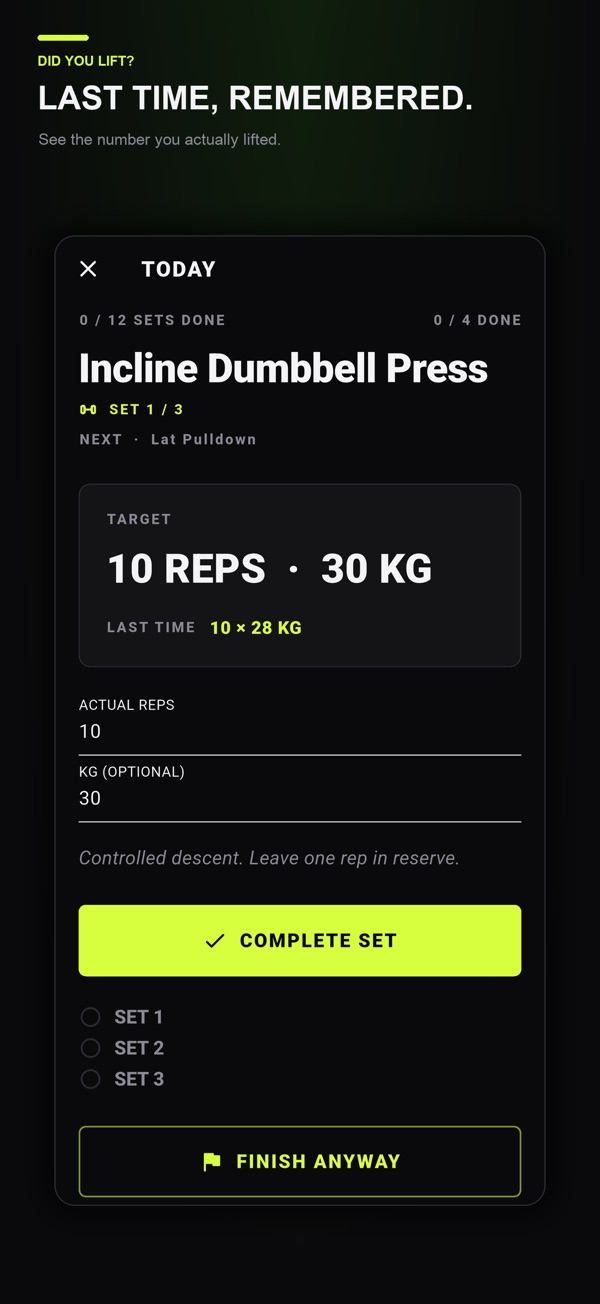
The two records can live on one screen, but they should not become the same value automatically. If the plan says 10 reps and you complete 8, the log should preserve 8.

Keep the plan small enough to follow
A useful plan does not need every possible detail. Start with exercise order, number of working sets, a rep target or range, and the intended rest interval. Add a short setup note only when it changes how you compare sessions.
For a reusable structure, see the weekly workout planning guide. The purpose is to reduce decisions during the session, not to create a document you cannot maintain.
Log the minimum comparable result
After each set, record the load and repetitions actually completed. Keep units consistent and decide whether a dumbbell value means one dumbbell or the pair. If an exercise changes meaningfully, use a distinct name or note the variation.
A rest timer can support consistency, but you do not need to record every second. Note an unusually short or long interruption when it affects comparison with the previous session.
Use one example to compare plan and reality
| Set | Planned | Completed | Useful note |
|---|---|---|---|
| 1 | 40 kg × 10 | 40 kg × 10 | As planned |
| 2 | 40 kg × 10 | 40 kg × 9 | Same setup |
| 3 | 40 kg × 10 | 37.5 kg × 10 | Load reduced |
Marking all three sets as “10 reps complete” would hide the information needed for the next session. The actual record shows where the original target stopped matching performance.
This example is about record keeping, not a recommendation for a specific load or progression. Follow a program appropriate to your experience and circumstances.
Review the difference before planning again
Look for repeatable comparisons rather than reacting to one number. If the same exercise, equipment and setup return, prior values can help you choose a realistic starting target. If several variables changed, preserve that context instead of treating the sessions as identical.
The progressive overload logging guide shows how to compare load, reps, sets, range and rest without reducing progress to a single metric.
Keep planning and logging together in Did You Lift
Did You Lift lets you prepare exercises and individual set targets, then enter the actual results set by set while the rest timer runs. Keeping the plan and the completed log together reduces the need to switch between notes, a timer and a separate history.
Use the record to support your chosen program, not to diagnose pain or decide whether an exercise is medically appropriate. Stop for concerning symptoms and seek qualified guidance when needed.
Common questions
What is the difference between a workout plan and a workout log?
A plan records intended exercises, targets and rest before training. A log records the exercises, loads and repetitions actually completed.
Should I copy planned reps into the workout log?
Only when those repetitions were actually completed. Recording the real result makes the next comparison useful.
What is the minimum information to log?
For a basic strength-training record, keep the exercise, set number, actual load, actual reps and any setup change that affects comparison.
Published by Moocsoft, the independent studio behind Did You Lift. Examples and worksheets are illustrative. App features can vary by platform and version; see the store listing for current availability and in-app purchases.