Total barbell weight = known bar mass + left-side plates + right-side plates. Add known collar mass too if your record includes it, and keep that convention consistent.
Add the bar and both sides once
Start with the physical pieces in the record. In this example, the left plates total 10 + 5 = 15 kg. The right plates also total 15 kg. Add the assumed 20 kg bar: 15 + 20 + 15 = 50 kg.
For identical plate stacks on both sides, the shortcut is bar + 2 × one side’s plates. The longer addition is useful when checking your arithmetic. A 30 kg entry would describe only these plates; a 35 kg entry would include the bar but omit one side.
These are fictional bookkeeping examples, not suggested lifting weights or loading instructions. “No collar mass counted” describes the arithmetic only; it does not mean removing safety equipment.

Check the bar before reusing yesterday’s number
A familiar-looking bar is not enough evidence for its mass. Read the equipment label or ask staff for the specification of that particular bar. If the mass remains unknown, record the bar identity and known plates without inventing a total.
| Known bar in example | Plates on each side | Calculation | Recorded total |
|---|---|---|---|
| 20 kg | 10 kg + 5 kg | 20 + 15 + 15 | 50 kg |
| 15 kg | 10 kg + 5 kg | 15 + 15 + 15 | 45 kg |
| Unknown | 10 kg + 5 kg | Unknown bar + 30 kg plates | Unknown; retain the parts |
For example, “blue-end bar; 15 kg plates per side; bar mass not confirmed” is a more useful historical note than a guessed 50 kg. Keep the unresolved value out of a numerical total until you can verify it.
For a fixed-weight bar, check whether its marked value describes the complete implement before adding anything. For a Smith machine, use that machine’s documented loading convention and identify the machine in your log. Do not treat a machine marking as an interchangeable free-bar total.
Count additions on both sides, and name the units
Returning to the 50 kg example, adding one 2.5 kg plate to each side adds 5 kg overall. The new arithmetic is 20 + 17.5 + 17.5 = 55 kg. Writing 52.5 kg would count only one of the two new plates.
If a separate example includes two collars with a known mass of 0.25 kg each, a collar-inclusive total for the original setup is 50 + 0.25 + 0.25 = 50.5 kg. Those collar masses are assumptions for this worksheet, not a statement about your equipment. A plates-and-bar log can exclude collars if clearly labeled; do not silently switch conventions between sessions.
Keep the inputs in one unit. A plate marked in pounds is not the same numerical mass in kilograms. Do not relabel the numbers when changing units, or combine a pound-marked bar with kilogram plates without conversion. If equipment gives two rounded labels, pick one consistent unit for the record.
Copy a complete entry into your workout log
The weight field should have a short, stable meaning: total bar plus both plate stacks, in kg. Put details that explain the number in a note. For the fictional first setup, a note could read: “20 kg bar; each side 10 + 5 kg; collars excluded from recorded load.”
| Set | Actual completed reps | Total entered load | Reps × entered load |
|---|---|---|---|
| 1 | 8 | 50 kg | 400 kg |
| 2 | 8 | 50 kg | 400 kg |
| 3 | 6 | 50 kg | 300 kg |
| Total | 22 | Same setup | 1,100 kg |
This record contains 22 completed reps, so its volume load is 22 × 50 = 1,100 kg. Using the planned eight reps for every set would produce 1,200 kg and overstate this record by 100 kg. Preserve the actual results; the bar-and-plate calculation does not fill in missing reps.
Volume load here is just repetitions multiplied by entered external load. It is not mechanical work, calories or a measure of which workout is better. The workout volume guide explains that distinction; the warm-up and working-set guide explains how to keep different set types separate.
Fix an old plates-only entry without rewriting history blindly
Suppose an older entry says “30 kg plates total, 20 kg bar,” with the same explicit convention as this example. You have enough information to derive a 50 kg bar-inclusive total. Retain the original note and state that the total was corrected to include the bar.
If the old entry says only “30,” you do not know whether that means plates on one side, both sides or the complete load. Leave its meaning unresolved. Adding 20 kg to every old entry could introduce errors rather than correct them.
Quick check: a 15 kg bar and 10 + 2.5 kg on each side. What total belongs in the log?
40 kg: 15 + 12.5 + 12.5. A 27.5 kg answer omits one side, and 25 kg omits the bar. This example excludes collar mass.
Dumbbells need their own explicit per-hand or combined convention. See one dumbbell or both? before copying a barbell rule into a dumbbell entry.
Keep the convention with your next set
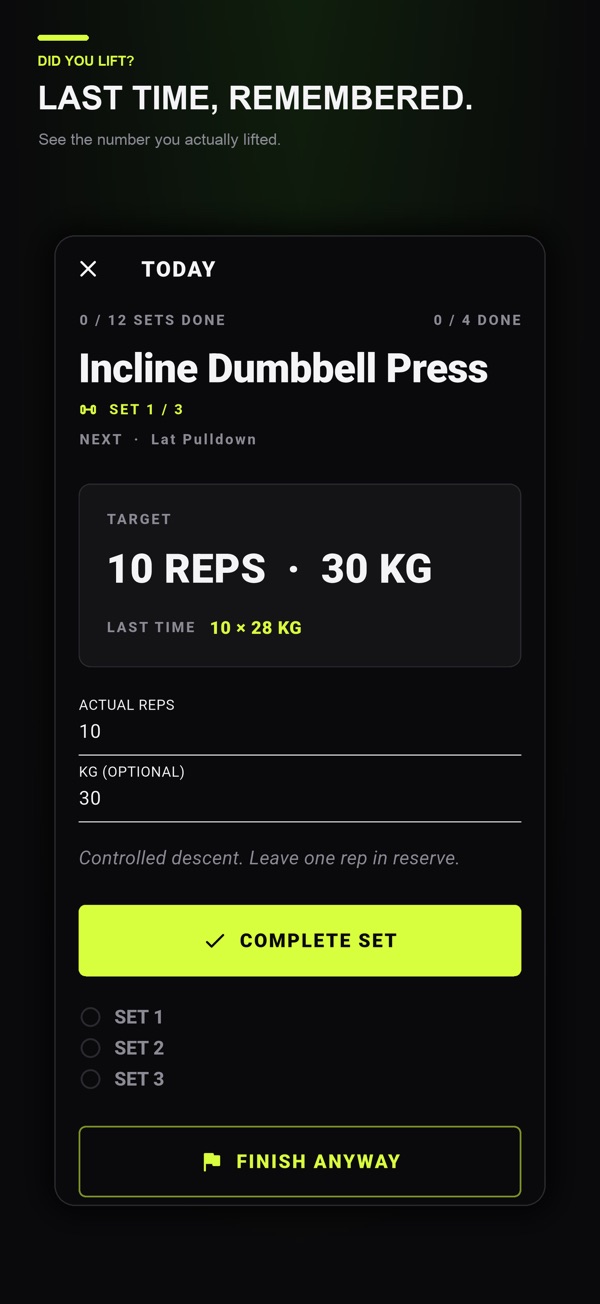
The official App Store listing and Google Play listing describe Did You Lift’s set targets, actual reps and weight logging, exercise notes and rest countdown. Use the note to preserve what your entered weight includes; verify the equipment separately.
Did You Lift is free to download with optional one-time Lifetime Premium. The listings place previous logged values, the exercise library and advanced week saving, copying and sharing in Premium. Check the current store details before purchasing. The app screenshot below illustrates the set log; the diagram above is an original teaching illustration.
For the next visit, the useful record is the exercise, equipment identity, actual reps, known total weight and units. If one of those is unknown, keep the uncertainty visible instead of making the log look more precise than the evidence.
Common questions
Do you count the bar when logging barbell weight?
Yes, when the field represents total barbell load: add the known bar mass and every plate on both sides. State whether known collar mass is included.
Does a 2.5 kg plate increase the total by 2.5 or 5 kg?
One such plate adds 2.5 kg. One on each side adds 5 kg in total. Count the pieces actually described by the record.
What if I do not know how much the bar weighs?
Check its label or ask for that equipment’s specification. Until verified, record the known plates and bar identity without inventing a total.
Should I add the bar to old workout entries?
Only when their original meaning and bar mass are known. An unlabeled number does not establish whether the bar was already included.
References and further reading
Published by Moocsoft, the studio behind Did You Lift. This guide uses AI assistance. How we prepare guides, label examples and handle corrections.