Start with published nutrition for the exact order, include sides and extras, and record the amount actually eaten. When nutrition information is unavailable, use a meal photo as a starting estimate and keep the unknown ingredients visible in your notes.
1. Look up the exact order before scanning
Check the restaurant’s official menu or nutrition page first. Match the item name, size, preparation and included sides. A lunch portion and a dinner portion can share a name without describing the same meal. A calorie figure for a plain item also may not cover the toppings you added.
In the United States, FDA menu-labeling requirements generally cover restaurants and similar retail food establishments in chains with 20 or more locations, doing business under the same name and offering substantially the same menu items. Do not assume every independent restaurant, country or customized order has the same information available.
Keep the source with your record: restaurant, item, size and date. A published figure is a useful starting point for the item it describes, not a measurement of the particular plate in front of you. If you find only an unrelated database entry, label it as a substitute rather than the restaurant’s own nutrition information.

2. Count the complete meal, not just the main dish
Check what the main-item figure already includes. Then account for separately listed sides, dressing, dips, toppings and drinks. Avoid counting an included side twice. When a component has its own published nutrition, record it separately so the arithmetic remains easy to review.
| Component | Hypothetical menu figure | Amount eaten | Recorded calories |
|---|---|---|---|
| Main dish, including its standard toppings | 680 kcal for the dish | All | 680 kcal |
| Separately ordered side | 160 kcal for the portion | Half | 80 kcal |
| Separate dressing portion | 120 kcal for the portion | Half | 60 kcal |
| Meal total | No other items in this example | As recorded above | 820 kcal |
Example total = 680 + (160 × ½) + (120 × ½) = 820 kcal
Those figures are invented to demonstrate the calculation. Replace them with information for your own order; do not use 820 as a default for a similar-looking meal. If you do not know the dressing amount, record that uncertainty instead of assuming it matches this example.
3. Check the serving and the portion you actually ate
Read whether a number describes one serving, one container, one piece or the whole dish. For packaged items bought with a meal, use the amount eaten and the nutrition label’s serving basis. Two servings of an illustrative 350-kcal item would total 700 kcal, not 350.
For shared food, describe your share as clearly as you can: one of four equal pieces, half of a separately portioned side or a measured amount when you have it. Taking half the visible plate area is not necessarily taking half the calories. Different ingredients and sauces may be distributed unevenly.
Photograph the meal before eating and, if useful, the leftovers afterward. The pair can remind you what remained, but it cannot recover an exact weight. Use the food-photo portion guide to distinguish countable items and known amounts from visual guesses.
Keep a simple separate note such as “full main, half side, dressing uncertain.” An honest portion note is more useful than a precise-looking total whose assumptions you cannot explain later.
4. Use a photo for missing information, not false certainty
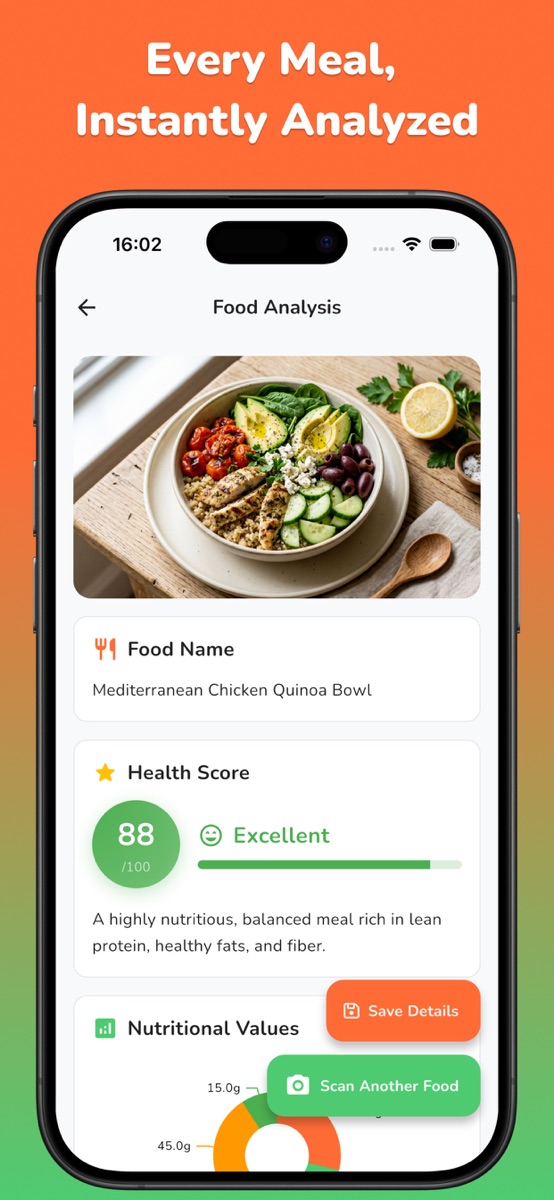
When the restaurant does not publish nutrition, photograph the whole meal in even light. Keep the plate or bowl visible, and include separately served components in the record. A photo can preserve visible foods and support an initial estimate; it cannot reliably reveal the recipe, hidden oil, filling or exact serving weight.
In NutriLens, scan the meal and review the identified foods and estimated calories and macros. Ask whether the analysis describes your actual plate. If a sauce is hidden or an item is misidentified, keep that discrepancy in your own notes. Do not automatically add the photo estimate to a menu total: the two may describe the same food and double-count it.
Choose a source for each component and make its basis clear. Use published item information where it matches; use a reviewed photo estimate where information is missing. This is still an estimate, not a reason to claim a fixed percentage of accuracy. The photo scanner versus food diary guide explains how to combine visual context with known quantities.
5. Keep a record you can use next time
Save four details in a separate note: what you ordered, how much you ate, where the numbers came from and what remains unknown. This lets you compare repeat orders on a consistent basis instead of starting from memory every time.
- Order: item, size, sides and customizations.
- Portion: all, a known share or an explicitly estimated amount.
- Source: official nutrition, package label or reviewed photo estimate.
- Unknowns: recipe changes, cooking fat or an unmeasured extra.
Try NutriLens for your next meal photo if a photo-first workflow makes this routine easier. It estimates meal calories and macros and offers meal comparison. Saving and revisiting scans is listed as a Premium feature on iOS; subscriptions and scan credit packs are available. Check the store listing for current access rather than assuming unlimited free scans.
Keep order details and corrections in your own notes; this guide does not imply an in-app restaurant database or a menu-import feature. For a repeatable photo record, see how to keep a food photo log.
Neither a menu number nor a scan verifies allergy safety. Ask the restaurant about ingredients and cross-contact, and seek qualified advice for medical nutrition needs.
Common questions
How can I estimate restaurant calories without nutrition information?
Take a clear photo, identify the visible components and record what you know about portions and extras. Review any AI estimate and keep unknown recipe details labeled as uncertain. A photo cannot give an exact calorie measurement.
Should I use the menu calories or a food-photo estimate?
Use published nutrition when it matches the exact item and size. A photo can add context or provide a starting estimate when information is missing. Do not add two estimates for the same component together.
Does NutriLens know the exact restaurant recipe?
A meal photo does not reliably reveal the exact recipe, hidden cooking fat or portion weight. NutriLens provides estimated calories and macros, which should be reviewed against the order and any nutrition information you have.
References and further reading
Published by Moocsoft, the independent studio behind NutriLens. Examples and worksheets are illustrative. App features can vary by platform and version; see the store listing for current availability and in-app purchases.