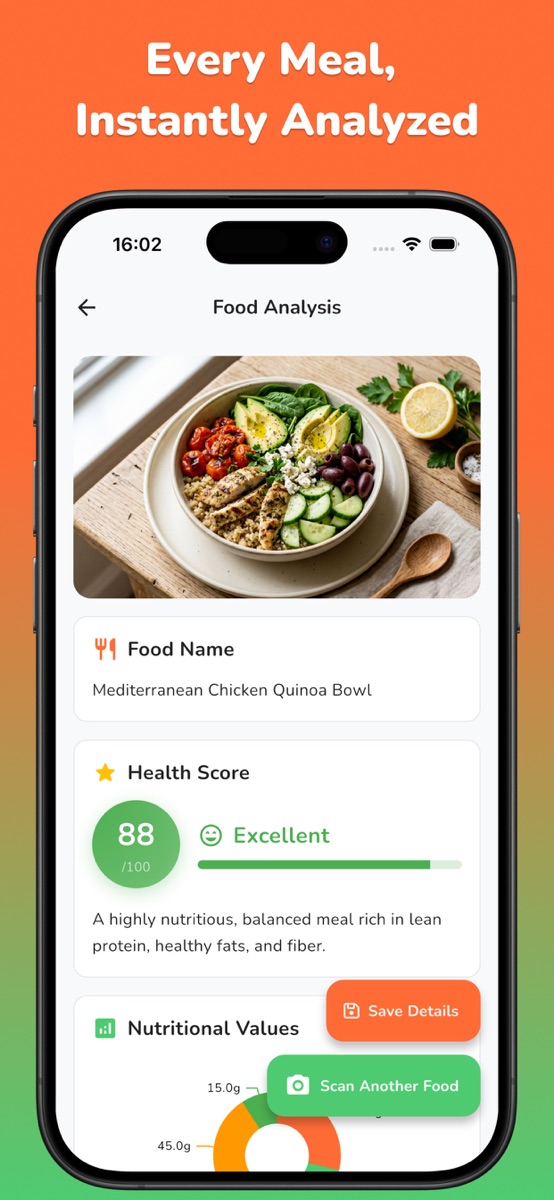
Before saving a scan, check whether the foods are identified correctly, whether the portion assumption is plausible and whether oil, dressing, drinks or fillings are missing.
Know what the camera can and cannot observe
| Visible clue | Useful for | What remains uncertain |
|---|---|---|
| Food shape and color | Suggesting possible foods | Recipe and exact ingredients |
| Relative area on the plate | A rough portion starting point | Weight, density and depth |
| Visible count | Recording slices, pieces or items | Size and ingredients inside |
| Container and presentation | Adding context to the meal record | Container capacity unless known |
The image may show grilled chicken, rice and vegetables, but it may not reveal how much oil was used, whether the sauce contains sugar or how deep the serving is. Keep those known details in your own notes so you can review the scan with more context.

Take a photo that preserves useful context
Keep the whole plate or bowl inside the frame, use even light and avoid filters that change the food’s color. A roughly 45-degree angle often shows both surface area and height. For a deep bowl or stacked meal, a second angle can clarify depth.
Include the container rather than cropping tightly around the food. It is context, not a ruler: plates and bowls vary in size. If you use the same container regularly, measure it once and keep that information with your routine.
For a fuller setup, use the food photo checklist before opening the scanner.
Run a three-check review before saving
- Food identity: does the result describe what is actually on the plate?
- Portion basis: is the proposed amount consistent with a known package, recipe share or measured quantity?
- Hidden items: are oil, dressing, sauce, drinks, fillings or toppings missing?
Write discrepancies in a separate food diary. When you do not know an amount, keep it as an estimate rather than replacing one unknown with a precise-looking guess. The portion-size guide explains which clues are stronger than visual volume alone.
Review a mixed meal step by step
| Part of meal | What you know | Review action |
|---|---|---|
| Chicken | Visible pieces; cooking fat unknown | Confirm food, note hidden oil uncertainty |
| Rice | One quarter of a known four-portion batch | Use the recipe share instead of visual guessing |
| Vegetables | Visible but partly covered | Check identity and avoid false precision |
| Sauce | Added after the photo | Record it separately in your food diary |
The goal is not to make every line exact. It is to replace avoidable errors with information you already have. For a homemade batch, the ingredient total and number of portions can be more useful than the appearance of the final serving. See the homemade-meal worksheet for that calculation.
Use a label or manual detail when it is stronger evidence
A packaged item with a readable nutrition label and a known amount may be easier to record manually than to infer from a photograph. The same applies to a recipe you measured while cooking. Photo scanning is most useful when it reduces friction without hiding the uncertainty that still exists.
You can mix methods: keep the meal photo as a visual record and record the known package quantity or recipe portion in a separate diary. If the calculated value differs from the scan, preserve the source and your calculation there. You can then see where each number came from when reviewing the meal.
Build a repeatable NutriLens workflow
Open NutriLens, photograph the complete meal and review the estimated foods, calories and macros. Keep a dated note of anything missing or uncertain in your own food diary. NutriLens can save scans for later review; the iOS App Store listing includes saving and revisiting meals in Premium. Check the current options in your version before planning to use that history.
For a first session, choose a familiar meal whose ingredients you know. Compare the analysis with your own notes, then use the same photo setup next time. NutriLens provides informational estimates and should not be used to determine allergy safety or replace individualized advice from a qualified health professional.
Common questions
Can a photo calorie scanner measure an exact portion?
No. A photo can support an estimate, but weight, depth, recipe details and hidden ingredients may remain unknown. Use measured or labeled quantities when available.
What should I check first after scanning?
Confirm the food names, then review the portion basis and write any missing items such as oil, sauce, dressing, drinks or fillings in your own notes.
How should I record a correction after a scan?
Keep the meal date, known quantities and any correction in a separate food diary or note. Keep the original scan estimate distinct from your own calculation so both remain understandable.
References and further reading
Published by Moocsoft, the independent studio behind NutriLens. Examples and worksheets are illustrative. App features can vary by platform and version; see the store listing for current availability and in-app purchases.