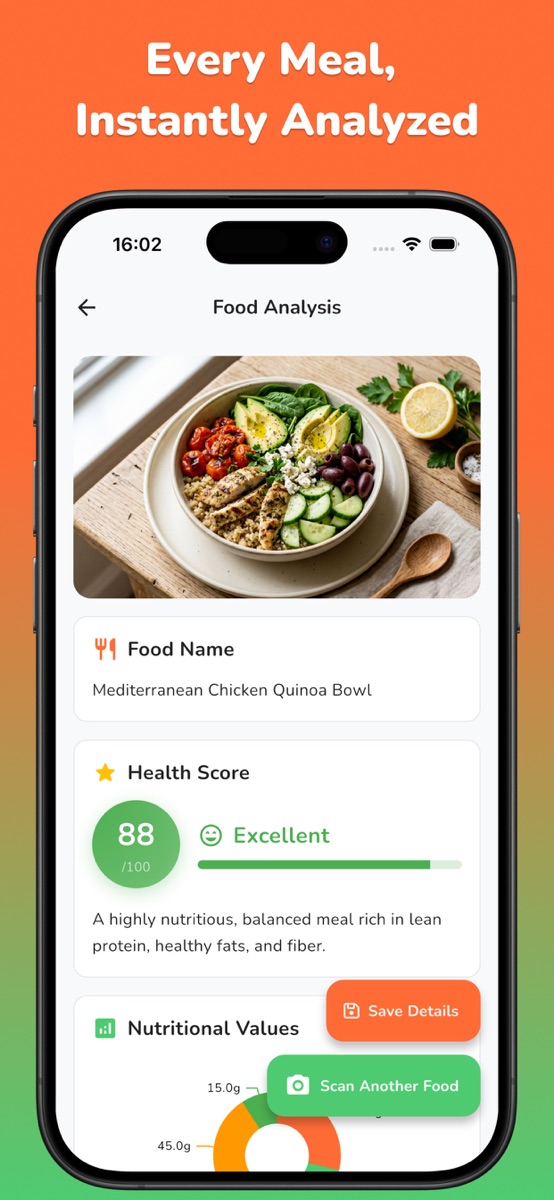
Use a clear photo of the full serving, check the food and portion the scanner identified, then account for sauces and extras outside the frame. NutriLens estimates calories and macros from a meal photo; review the estimate against what you know about the dish.

Choose the starting point that fits your meal
A mixed restaurant plate is a useful place to try a photo estimate with NutriLens, our food scanner for iPhone and Android. A product label or a recipe with known ingredient amounts can supply details that an image cannot. Choose the source that tells you the most about the serving you actually ate.
| Meal situation | Start with | Check next |
|---|---|---|
| Packaged food with a label | Nutrition label and amount eaten | How many labeled servings you ate |
| Home recipe with known quantities | Ingredient totals for the batch | Your share of the finished food |
| Restaurant or mixed plate without a recipe | Photo estimate and what you know | Portion, preparation and separate extras |
If you know the recipe, use the homemade-meal portion worksheet. If you are trying to understand protein, carbs and fat in the result, start with calories versus macros. A daily target calculator answers a different question from the calories in this particular plate.
Start with a photo that shows the meal
Place the meal in good light and keep the full plate or bowl in frame. Avoid photographing only the most attractive part of the dish: the side of bread, dressing cup and drink can all matter to your record. If you share a platter, decide which portion is yours before logging it.
A top view helps show the meal components. A deep bowl can conceal food underneath, so add a note about what you know is there. The purpose is to make the meal easier to interpret, not to take a perfect picture.
Check three things after the scan
- Food: does the identified dish match what you ate? A sauce-covered portion can resemble several different foods.
- Quantity: is the suggested portion close to your serving? A full restaurant bowl and a small side should not share the same assumption.
- Preparation: account for ingredients you know about, such as cooking oil, butter, dressing or a filling hidden inside the food.
NutriLens can provide a meal estimate, but your knowledge of the dish is useful context. When the app result cannot represent an important detail, keep that detail in your own note or use a recipe calculation instead of quietly accepting the number.
Use this meal-review checklist
| Part of the meal | What to check | Useful record |
|---|---|---|
| Rice or grain base | Small scoop or most of the bowl? | Approximate amount or measured weight |
| Protein component | Which food and preparation? | Name plus grilled, fried or another method |
| Sauce or dressing | Included, mixed in or added later? | Type and approximate amount |
| Extras | Drink, bread, cheese or toppings? | Record separately if outside the photo |
These are review prompts, not fixed calorie values. Two bowls that look similar can have different amounts and ingredients.
Check the label basis before scaling an extra
The FDA explanation of serving sizes on food labels distinguishes a labeled serving from a recommendation of how much to eat. A package can contain several servings, and some labels show both per-serving and per-package values.
- Read the serving amount and servings per container.
- Choose the calorie column that matches your calculation: one serving or the full package.
- Compare that quantity with the amount actually added to your meal.
Do not multiply a full-package total by the number of servings again. Keep the label basis beside your note so you can tell a measured extra from the approximate meal scan.
Work through an extra that the photo missed
Imagine that you photograph a lunch bowl, then add a separately packaged topping. The topping label in this invented example lists 120 calories per 30 grams, and you use 45 grams. The label-based calculation is:
45 ÷ 30 = 1.5 servings
120 × 1.5 = 180 calories
The topping therefore contributes 180 calories under those example label values. The bowl itself remains a photo estimate. Before combining anything, check whether the scan already included a topping: adding it a second time would overstate the meal.
| Record | What the note says |
|---|---|
| Photo scope | One lunch bowl before the topping was added |
| Known addition | 45 g topping; label calculation gives 180 kcal |
| Still uncertain | Amount of cooking oil and sauce in the bowl |
| Final interpretation | Approximate bowl estimate plus the separately recorded topping |
This worksheet can live in a plain note; it is not a claim that every field is editable inside the scanner. The useful distinction is between information you know from a label and information the photo only suggests.
Know when another method is better
For packaged food, use the label and the amount eaten on the same serving basis. For a homemade recipe, ingredient amounts and a portion calculation can provide information the photo does not contain.
For a restaurant meal with no recipe available, keep the estimate labeled as approximate. Repeatedly changing a number until it looks reassuring does not improve its accuracy. A short note such as “sauce amount unknown” makes the limitation clear when you review the meal later.
If you need accurate allergen information, check the packaging or ask the food preparer. A food image cannot establish that a meal is safe for an allergy.
Try the process on one familiar meal
- Take a photo or choose a meal image in NutriLens.
- Check the food identification and estimated calories, protein, carbs and fat.
- Review the serving against your photo and any label or recipe you have.
- Keep a note of anything missing or uncertain before revisiting the result.
NutriLens offers saved scans, with some features requiring an in-app purchase. See the app preview and download options before deciding whether it fits your routine. For a repeatable record, use the food photo log guide to choose what you want to remember about each meal.
Common questions
Can a photo tell me the exact calories?
No. A photograph does not measure the full recipe, hidden ingredients or the exact portion. Treat the result as an estimate and check information you know.
Do I need a barcode?
NutriLens analyzes meal photos. For a packaged product, the nutrition label is still useful when checking serving size and nutrients.
Should I add sauces to the calorie result?
First check what the estimate already covers. Record a sauce separately only when it was not included, using its label or recipe information when available. Otherwise, note that the amount is uncertain.
References and further reading
Published by Moocsoft, the independent studio behind NutriLens. Examples and worksheets are illustrative. App features can vary by platform and version; see the store listing for current availability and in-app purchases.