Ask who has the authority to confirm each result. Then check whether an existing service already provides it. Needing a backend does not automatically mean building a custom server.
Start with the operation, not the technology
A backend is the part of a product that runs away from the user’s device and provides services to it. It might be an existing business API, a managed database with access rules, or custom server code. The mobile interface is a separate decision: choosing Flutter does not answer who controls the records.
Underline the verbs in your feature list: record a note, request a place, confirm a reservation, approve an expense. Those verbs can require different authority even when their screens look similar. A phone can keep a draft; it cannot independently promise the last available place to every customer.
Local persistence is a real option, not a missing backend waiting to happen. Flutter’s SQLite recipe shows how an app can store and query records on the device. Whether that is sufficient depends on the job those records must do.
Mark the features that need remote authority
These are fictional planning examples, not claims about a particular app or a recommendation to use one provider. “Remote service” can mean a service you already have; it does not necessarily mean new infrastructure.
| Feature | Who determines the result? | Backend decision to make |
|---|---|---|
| Keep a private reading note on one phone | The person using that device | No remote data service required for that operation. Decide separately about recovery or sharing. |
| Show a public list of opening hours | The business publishing the hours | A hosted page or existing content API may be enough; a new custom server is not automatically needed. |
| Reserve the last appointment slot | The booking system controlling availability | Use a service that checks and confirms the reservation, not just a local success screen. |
| Let staff approve a customer request | Authorized staff acting on the shared record | Define roles and enforce permission checks in the remote service. |
| Call a provider using a private service credential | A trusted service authorized to call that provider | Keep privileged credentials out of the distributed app; decide who operates the trusted caller. |
| Keep account records current across devices | The service holding the shared account records | Define account access and a remote data service, then plan synchronization behavior separately. |
Do not reduce the decision to “online means custom backend.” An app displaying public information may only need a permitted public endpoint. Conversely, an app with a very small interface can still need careful remote approval rules. List the exact operation and the source that is allowed to decide it.
Worked example: a saved request is not a confirmed booking
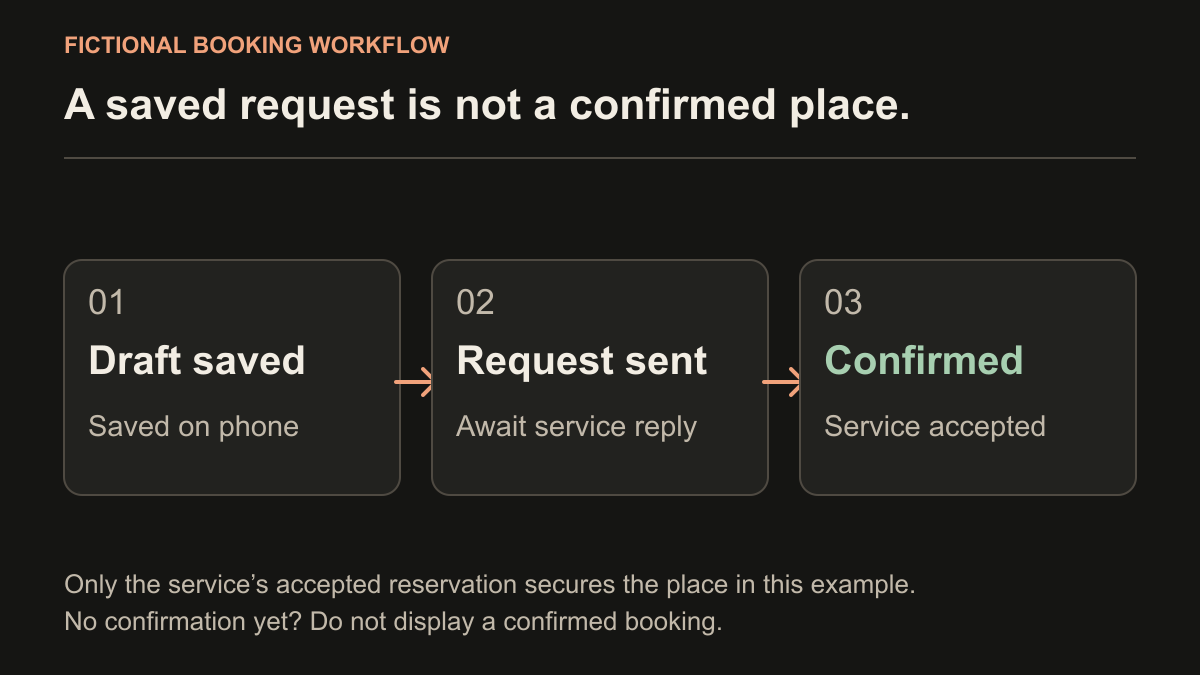
Imagine a fictional class-booking app with one place left in a session. Maya and Leo both see that place. Maya taps “Book,” and her phone saves a request. Leo’s phone does the same. Two saved requests do not create two available places.
In this example, the booking service is responsible for checking availability and accepting at most one reservation for that place. The interface should distinguish a draft, a submitted request and a reservation actually confirmed by that service. If no confirmation arrives, it should not tell the customer the place is secured.
| Operation | Allowed actor | Required confirmation | Scope question |
|---|---|---|---|
| Prepare a booking request | Customer on their device | Local draft saved | Can the customer edit or discard it before sending? |
| Accept the reservation | Booking service | Service returns a confirmed reservation or a refusal | Does the existing booking provider support this operation and prevent overbooking? |
| Cancel the reservation | Reservation owner or an authorized staff member | Service confirms the updated reservation state | Which actor may cancel, and what is the agreed cancellation rule? |
| Change session capacity | Authorized staff | Service accepts the staff change | Is there an existing admin interface, or does one belong in the project? |
This identifies the missing work more clearly than “add a database.” A database is one component; the acceptance rules and the person responsible for the service still need to be specified. Network retries, local queues and conflicting edits are separate implementation questions covered in the offline-first Flutter guide.
Check existing API, managed backend and custom logic in that order
First ask whether the business already has a system that owns the result. For a booking provider, request current API documentation and a safe test environment. Check whether it supports the actual action, the intended access method and the required permissions. A website login or a spreadsheet export is not evidence that a suitable API exists.
Next consider whether managed backend products can supply the required pieces. Firebase’s Flutter documentation, for example, describes separate products for authentication, cloud data and backend functions. Using them is still using a backend; it can remove the need to operate some infrastructure, not the need to design the product’s rules.
Custom server logic may be needed where the existing service cannot enforce the required business operation, or where several systems must be coordinated. A function on managed infrastructure can contain custom logic too. These options can be combined: an existing booking API, a managed sign-in service and a small custom integration are not mutually exclusive.
Ask for an explanation tied to your operations, rather than “this is the stack we always use.” Record unsupported actions, provider restrictions and unanswered access questions before treating an option as ready to estimate. This checklist does not rank providers or promise a fixed cost.
Define access rules, not just a login screen
Authentication establishes who is making a request. Authorization decides what that person may do. In the booking example, a customer should not become staff merely by signing in, and should not be able to cancel another customer’s reservation by changing a record identifier.
Cloud Firestore’s security overview describes authentication, authorization and validation for its mobile and web clients. Firebase’s user-based rules guidance shows how access can depend on the requester’s identity and the record being accessed. A managed database still needs appropriate rules and verification.
Write checks such as “customer A cannot read customer B’s private reservation” and “a customer cannot set their own staff role.” Hiding a button is not the same as enforcing those rules in the service. Agree with the developer how the service will reject an unauthorized request, not just how the screen will look.
Also distinguish public client configuration from privileged credentials. Firebase explains that its Firebase-service API keys identify a project rather than authorize access to its data; follow its restrictions and security guidance. That is not permission to embed another provider’s secret key or a service-account private key in a mobile app. For server code that needs secrets, Firebase documents a Cloud Functions integration with Secret Manager. Keep actual credentials out of public project briefs.
Fill in a backend decision record before the estimate
Create one decision record for each meaningful operation using the fields below. Use a role or organization for the responsible owner, not a password or private account detail. “Undecided” is useful: it identifies a question to resolve rather than silently assigning the work to someone.
| Field | What to write | Fictional booking example |
|---|---|---|
| Operation and authoritative record | What changes, and which system owns the accepted result? | Confirm a place; the booking provider owns availability and reservations. |
| Allowed reader and writer | Who can see the record, and who can change which fields? | A customer sees their reservation; staff can manage session capacity. |
| Confirmation shown to the user | What response means the operation actually succeeded? | A confirmed reservation returned by the booking service, not a saved draft. |
| Existing service and evidence | API documentation, supported action and test access status | Provider API identified; cancellation permission still undecided. |
| Missing service work | Integration, remote rules, custom logic or admin interface | Integrate reservation creation; verify staff permissions; reuse the provider’s admin interface if suitable. |
| Ongoing service owner | Who manages access, usage bills, failures and later changes? | Business owns the provider account; maintenance responsibility to be agreed. |
“No custom backend” does not mean “no third-party services” or “no data leaves the phone.” List the services and SDKs actually used, what data they receive and why. Keep that inventory aligned with the product’s privacy information; a storage label alone is not a privacy review.
Once these rows are clear, add them to your first-release MVP brief. Use the handover checklist later to verify account responsibilities, build instructions and the next update path.
Take a concrete question to your developer
Instead of “Do I need Firebase?”, ask: “Which service confirms this action, which actors may change the record, and what is still missing?” A useful answer should identify existing capabilities, new work and unresolved dependencies.
For the fictional booking app, that might be: “Keep an editable request on the phone, send it to the existing booking provider for confirmation, enforce customer and staff access remotely, and reuse the existing admin panel if it supports the required staff task.” It is a scope decision to verify, not a completed design or a promise that every provider supports it.
Moocsoft offers Flutter mobile app development. Bring your core user journey, this decision record and any existing API documentation to discuss the actual scope. Share access through an appropriate separate process, not by pasting secrets into a brief.
Common questions
Can a Flutter app work without a backend?
Yes, when its required operations can be completed on the device, such as keeping a personal local record. Centrally updated shared records, remote approvals and private service integrations introduce separate backend requirements. A manual file transfer is a different operation from ongoing sync.
Does using Firebase mean I do not have a backend?
No. Firebase provides backend products, including authentication, cloud data and functions. You may avoid operating a custom server while still needing access rules, service configuration and an ongoing owner.
Do I need a new backend if my business already has an API?
Not necessarily. Check whether the existing API supports the exact operations, permissions and intended app access. Missing business rules or integrations may still require additional work.
Is adding login enough to protect private records?
No. Identifying a user and authorizing an action are different tasks. The remote service must enforce which records and operations that user is allowed to access.
References and further reading
- Flutter: Persisting local records with SQLite
- Firebase: Backend products available for Flutter
- Firebase: Cloud Firestore authentication, authorization and validation
- Firebase: User identity and record access rules
- Firebase: Client API keys, restrictions and data access controls
- Firebase: Cloud Functions configuration and secret parameters
Published by Moocsoft, an independent Flutter development studio. Examples and worksheets are illustrative. Project scope, platform requirements and release responsibilities need to be agreed for each project.